A grant is different from an individual donation in almost every way. It starts with a relationship with a funder, passes through a proposal, a review and a wait, and can take weeks before a decision arrives. Once approved, it comes with conditions: a specific purpose, a set amount and reports the funder expects. When institutional grants are run from a shared spreadsheet and scattered emails, the details often get lost between staff. In this article we explain how a charity follows the whole journey of a grant in Najeed.
Why do grants need their own follow-up?
A charity working with several funders faces questions individual donors rarely raise:
- Where are we with this funder? Early contact, a proposal submitted, or a decision we're waiting on?
- Who is following up? And what was the last contact?
- What amount are we aiming for, and how much has arrived?
- Where was the money spent? The funder will ask, and the charity has to answer with numbers.
Without answers, follow-up slows, the funder's confidence slips, and an opportunity that could have been won is lost.
Donor opportunities: a path from first contact to approval
In the donors and campaigns module of Najeed there is a dedicated path for donor opportunities, which follows a funder from first contact to grant approval. Instead of an opportunity being a message in one employee's inbox, it becomes a record in the system that the whole team can see, so everyone knows where it stands.
Once approved, the grant turns into a campaign automatically, with its target and its cost center in accounting. The team doesn't have to recreate it by hand, and the grant doesn't start its life in a file separate from the rest of the charity's numbers.
After approval: the grant is a campaign with a target and an amount raised
When a grant becomes a campaign, it joins the same list where the charity tracks all its programs:
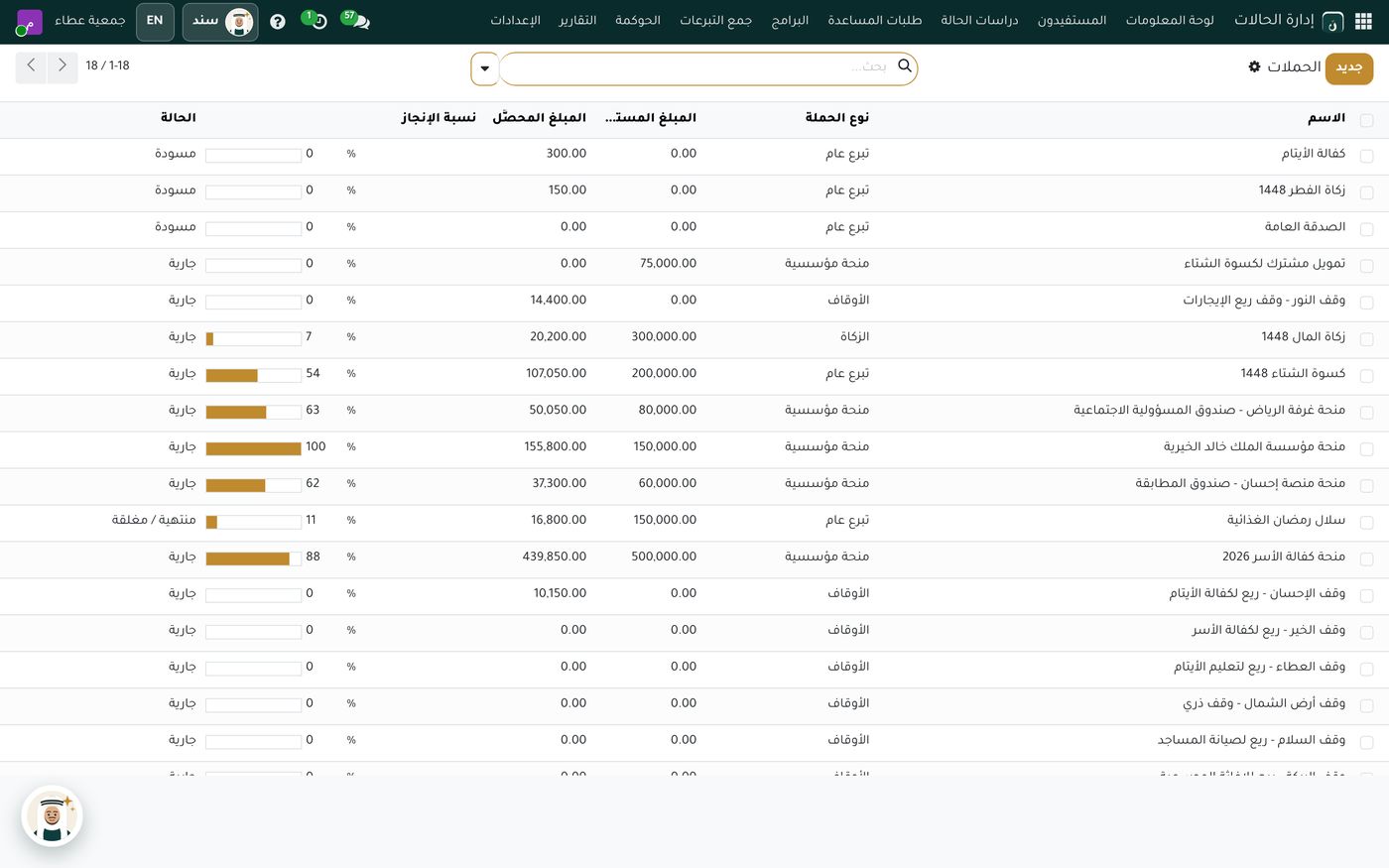
In this demo screen, several campaigns of the institutional grant type sit among general giving, zakat and endowment campaigns. Next to each one are its target amount, what has been raised and a progress bar. Some are close to complete, some are just starting, and some haven't received anything yet. This list answers management's first question: which grants need attention now?
And because every campaign carries a target, an amount raised and an amount spent, the person responsible can see how much of the grant has arrived and how much has gone out, which is usually what the funder asks for in a report.
The grant in the donations record
When the grant amount arrives, it's recorded in the system and shows up on the donations dashboard the manager opens:
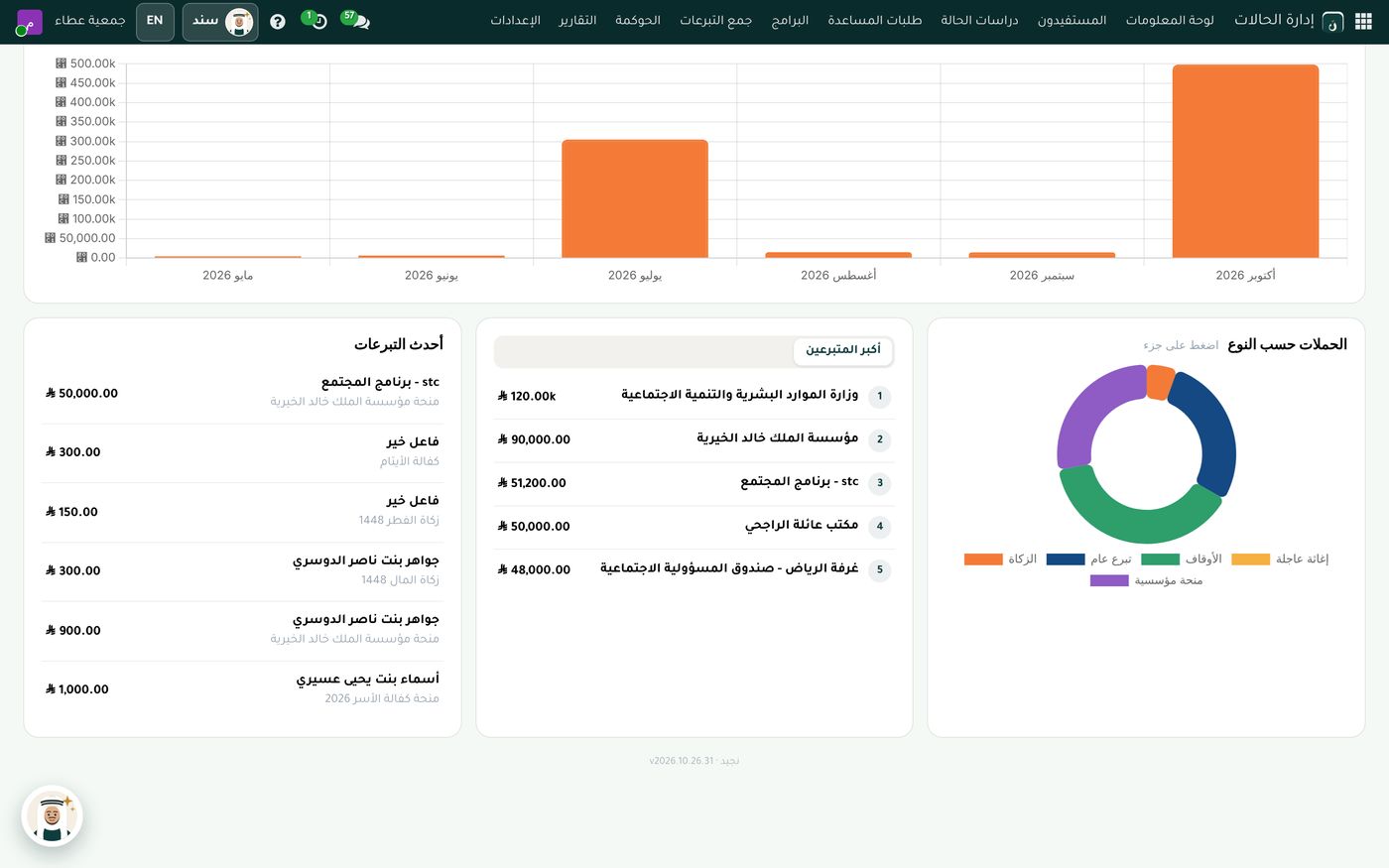
The dashboard shows the latest donations with the campaign linked to each, a top donors list that includes institutions alongside individuals, and a doughnut chart of campaigns by type where the institutional grant type has its own color. In the demo data one month's bar stands well above the rest, which is what happens in real life when a large grant lands in one payment, and a good reason to read months together rather than one at a time.
A grant is restricted money: keep it separate
A grant is usually earmarked for a particular program, which makes it restricted funding in most cases. That's why it matters for it to have a cost center and accounting that separates it from general donations, which is what linking it to a campaign with its own cost center does. For the difference between restricted and unrestricted funds, read restricted and unrestricted net assets.
A weekly routine for following funders
The path is simple, but consistency is what decides the outcome. Here are steps a grants officer can follow:
- Review open donor opportunities and flag anything not contacted for a while.
- Move each opportunity to its next stage after every meeting or exchange.
- Open the campaigns list and check the progress of approved grants.
- Compare what's raised with what's spent for each grant before the funder asks for a report.
- Send the funder an impact report on what their grant achieved. The idea is covered in our article on impact reports for donors.
Sanad, the organization's private AI assistant, can also answer your team's questions about using the system.
Summary
An institutional grant is a long relationship, and it needs a clear record, not one employee's memory. With a path for donor opportunities from first contact to approval, a grant that turns into a campaign automatically with a target and a cost center, and a campaigns list and donations dashboard showing what has arrived and what has been spent, answering a funder's questions becomes easy. If you'd like to see it on demo data, the Role8 team will be glad to walk you through it.
Try Donors and campaigns in Najeed
Try Najeed with demo data, or contact us and we'll set up the system for you.